📘 Part 2: From Events to Dashboards
🌸 1. Running the ML Sidecar, Lookups & Visual Exploration
In Part 1, we focused on the engine itself: how authentication behavior is modeled, clustered, scored, and turned into explainable anomaly signals.
In this second part, let’s be a bit more practical.
We’ll walk through:
- The full project layout,
- How data flows from Splunk into the ML Sidecar,
- How the pipeline is executed,
- What gets written back to Splunk,
- And how we can quickly explore the results using dashboards and lookups.
No deep math this time, just connecting the dots end to end.
Also, if you want to deepdive the math and code;
- 📘 Part 1: Building a Behavioral ML Engine for Windows Authentication Logs
- 📁 Repository: Check out the GitHub - seynur-demos
🗂️ 2. Project Structure: What Lives Where?
Before running anything, it helps to understand how the pieces are separated. The repository is intentionally split into three main parts:
splunk_ml_sidecar/
│
├── ml_sidecar/                     ← Python ML engine
│   ├── config/settings.yaml
│   ├── core/*.py                   ← Features, modeling, pipeline logic
│   ├── models/                     ← Trained K-Means + metadata
│   ├── run_auto.py
│   └── README.md
│
├── splunk_ml_sidecar_app/           ← Splunk app
│   ├── local/collections.conf
│   ├── local/transforms.conf
│   ├── local/inputs.conf
│   └── local/data/*
│
└── auth-windows-log-generator-as-json-with-real-user-behaviour.py
Why this separation?
ml_sidecar/: This is the brain. All ML logic lives here and runs outside of Splunk indexing.-
splunk_ml_sidecar_app/: This is the UI & storage layer.- KVStore collections - dashboards - lookups and transforms - log generator script
A helper script we used to generate realistic synthetic Windows authentication logs for testing and experimentation.
Keeping these layers separate makes the system easier to reason about, and easier to replace parts later.
Also, keep in mind: I just wanted to illustrate that we can create a self-controlled system in this project. Of course, there can be some enhancements to the algorithm and the general logic.
3. 🧪 Input Data: What Are We Feeding the Engine?
For this project, we used synthetic Windows authentication events generated as JSON. If you want, you can also check generator script from the repository.
Example event:
{"TimeCreated": "2025-12-15T07:55:44.007717Z", "user": "svc-web", "src_user": "svc-web", "src": "10.10.2.120", "dest": "SERVER011", "signature_id": 4624, "signature": "An account was successfully logged on", "action": "success", "process": "C:\\Windows\\System32\\lsass.exe"}
These events are ingested into Splunk first (as normal logs) and then read back by the ML Sidecar.
💡 The key idea: Splunk remains the system of record for logs. The ML Sidecar only reads data and writes results to KVStore. Also, because output will be crowded, don’t forget to change your lookup configurations according to your environment.
▶️ 4. Running the Pipeline
Once data is available in Splunk, running the full pipeline is intentionally simple. You can also, find pre-requriments from the splunk_ml_sidecar/README.md file.
- pull the repository from the Github. We will use
splunk_ml_sidecardirectory but you can check out our other demos from this repository. 🐣gh repo clone seynur/seynur-demos - Install the ML Engine
cd splunk_ml_sidecar/ml_sidecar pip install -e . - Configure:
- both ingestion and output Splunk REST token (
ingestion.auth_token&output.auth_token) & base Splunk urls (ingestion.base_url&output.base_url). Also, you can modify all configurations in the settings.yaml file as you desired.
Note: We have both ingestion and output configurations that you may want to collect input from X server and send all data to another server setup.
-
ingestion.earliest&ingestion.latesttime. Right now, we are ingesting the last 90 days. -
you can modify your modeling setups. For more information, you can check either my previous blog or splunk_ml_sidecar/ml_sidecar/README.md file.
Note: There is no other algorithm other than k-means at this moment in this study.
- both ingestion and output Splunk REST token (
-
Change
OUT_FILEas your full input file path in the generator script, and generate synthetic authentication logs.python3 auth-windows-log-generator-as-json-with-real-user-behaviour.py -
Configure Splunk to ingest the synthetic data.
# splunk_ml_sidecar/splunk_ml_sidecar_app/local/inputs.conf [monitor://<full-path-of-the-input-file>] disabled = false index = ml_sidecar sourcetype = ml:sidecar:json -
Restart Splunk after adding the app, and validate the KVStore contents below and inputs exist in Splunk.
   auth_events_lookup
   auth_outlier_events_lookup
   auth_cluster_profiles_lookup
   auth_user_profiles_lookup
   auth_user_thresholds
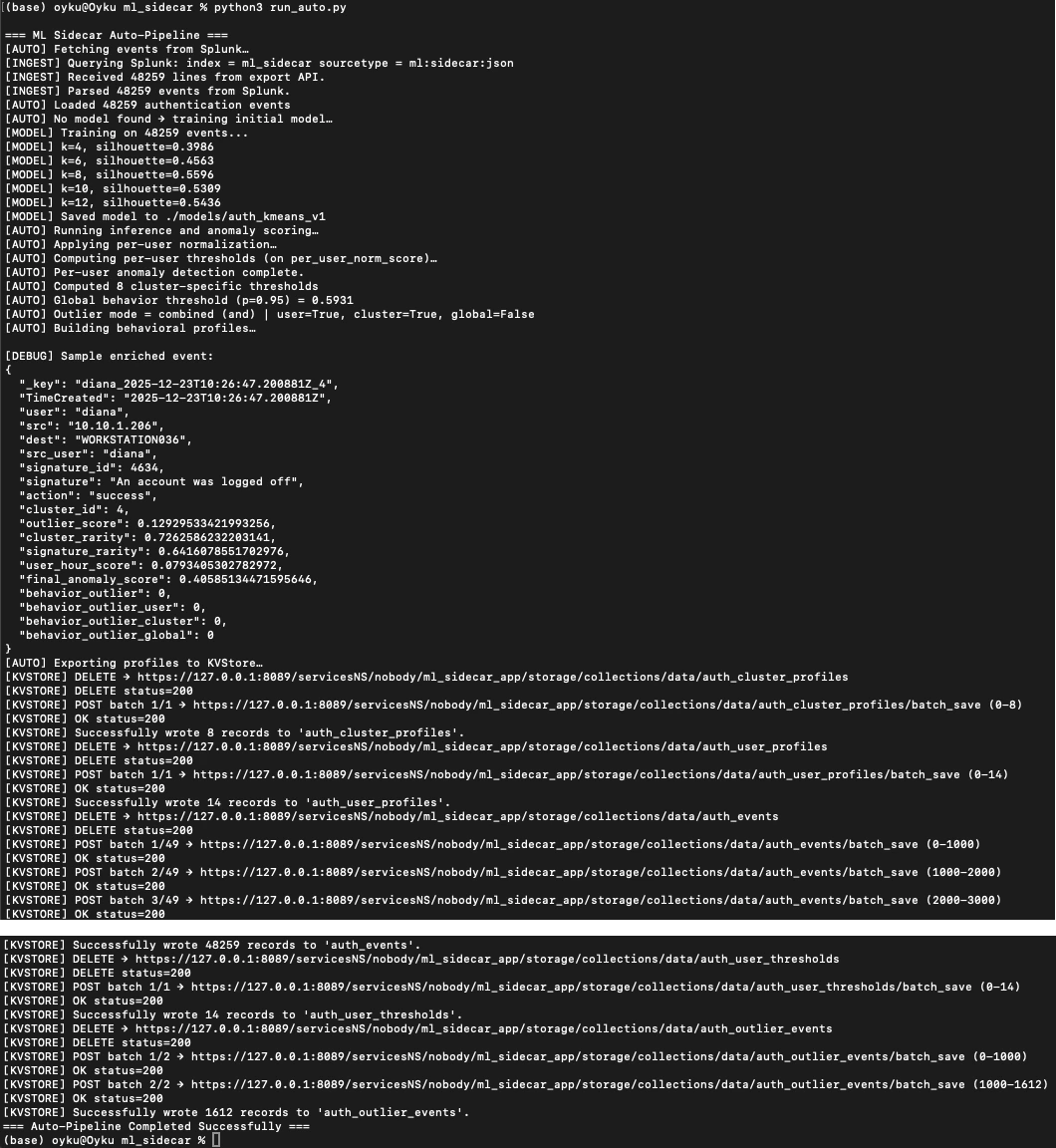
Once data is available in Splunk, running the full pipeline is intentionally simple.
From the splunk_ml_sidecar/ml_sidecar/ directory:
python run_auto.py
 |
|---|
Figure 1 example of the run_auto.py script outputs on the cli. |
That’s it. 🌸
Behind the scenes, this triggers the full chain:
- Load configuration from settings.yaml
- Pull authentication events from Splunk via REST
- Train or load an existing K-Means model
- Check for behavioral drift
- Score all events
- Apply adaptive thresholds (user/cluster/global)
- Build profiles and enriched event records
- Write everything into Splunk KVStore
If this is the first run, a model is trained. On later runs, if the drift level is enough for your new data, the engine reuses the model unless drift is detected.
📦 5. What Gets Written Back to Splunk?
Instead of indexes, the Sidecar writes structured KVStore collections. This keeps dashboards fast and avoids recomputing ML logic during searches.
Main KVStore Collections
-
auth_events: contains enriched event-level records.
- cluster_id - anomaly scores - outlier flags (user / cluster / global) -
auth_user_profiles: contains long-term user behavior summaries.
- dominant cluster - confidence - mean / std login hour -
auth_cluster_profiles: contains cluster-level behavior summaries.
- signature distributions - private IP rates - user counts -
auth_user_thresholds: contains daily snapshot of;
- per-user thresholds - global threshold - percentile used -
auth_outlier_events (optional): Only events flagged as outliers
— useful for focused dashboards or alerts.
📊 6. Bonus: Dashboards - Making Sense of the Output
Once the KVStore collections are populated, dashboards become very lightweight. And yes, I only create a dashboard instead of create fancy UI for now. If you want you can check out dashboards instead of checking step by step via SPLs. 🪄
There are three different section in “Authentication ML Anomaly Detection Test” dashboard. Also, this will be generated automatically with the splunk_ml_sidecar_app.
Typical views include:
- User Behavior Overview Panel: Which clusters does a user normally belong to?
- Cluster Analytics Panel: What kind of behavior lives in each cluster?
- Anomaly Explorer Panel: Top events by final anomaly score.
Furthermore, you can check the lookups directly.
7. 📘 Wrapping Up
With Part 1 and Part 2 together, we now have the full picture:
- how authentication behavior is modeled
- how anomalies are scored and explained
- how results flow back into Splunk
- and how analysts can explore them visually
There’s still plenty of room to extend this:
- new ML algorithms & adjustments
- peer-group modeling
- risk aggregation
- alerting strategies
But even in this state, you can think of it as a starting point to develop your model instead of using it directly in production, like a playground for behavior-first security analytics.
📁 Full code & documentation: GitHub Repository
If you end up trying something similar or break it interestingly, I’d love to hear about it. 😊
Connect with me on LinkedIn or drop a comment on the blog.
Until next time 👋🔍
References:
-
[1] Seynur (2025). seynur-demos/splunk_ml_sidecar [GitHub repository]. GitHub. https://github.com/seynur/seynur-demos/tree/main/splunk/splunk_ml_sidecar
-
[2] Can, Ö. (2025). 📘 Part 1: Building a Behavioral ML Engine for Windows Authentication Logs. https://blog.seynur.com/splunk/2025/12/24/building-a-behavioral-ml-engine-for-windows-authentication-logs-part1.html
-
[3] Splunk Inc. (2024). Splunk REST API Reference – Search Job Export Endpoint. https://docs.splunk.com/Documentation/Splunk/latest/RESTREF/RESTsearch
-
[4] Splunk Inc. (2024). Working with KV Store Collections in Splunk. https://docs.splunk.com/Documentation/Splunk/latest/Admin/AboutKVstore
-
[5] Pedregosa, F., Varoquaux, G., Gramfort, A., et al. (2011). Scikit-learn: Machine Learning in Python. Journal of Machine Learning Research, 12, 2825–2830. https://jmlr.org/papers/v12/pedregosa11a.html
-
[6] Tan, P.-N., Steinbach, M., & Kumar, V. (2019). Introduction to Data Mining (2nd ed.). Pearson. (Reference for clustering, silhouette score, and distance-based anomaly concepts.)
-
[7] Chandola, V., Banerjee, A., & Kumar, V. (2009). Anomaly Detection: A Survey. ACM Computing Surveys, 41(3). https://dl.acm.org/doi/epdf/10.1145/1541880.1541882