Bridging LLMs and Operational Data with MCP Using Splunk
Large Language Models (LLMs) are becoming increasingly capable, but their true potential is unlocked only through direct interaction with real systems. Without access to logs, metrics, APIs, and services, an LLM is limited to isolated text generation and lacks operational context.
The Model Context Protocol (MCP) is an open-source standard that aims to overcome these limitations by defining a standardized and controlled way for AI models to interact with external systems, tools, and data sources.
This article explores the core concepts of Model Context Protocol (MCP) and MCP Servers, and demonstrates how they can be applied in a real-world Splunk use case using Claude.
Model Context Protocol
As previously mentioned, MCP defines how AI models interact with external tools and data sources. Its primary objective is to establish a standardized and controlled communication layer that connects AI systems with real-world services and data.
MCP is structured in two layers: an inner data layer that defines the JSON-RPC protocol and core primitives (tools, resources, prompts), and an outer transport layer that handles communication mechanisms such as connection establishment, message framing, and authorization.
Within this framework, the MCP Server acts as an intermediary, exposing tools, data, and prompts in a structured and discoverable format. This enables models to dynamically identify available capabilities and interact with themwithout relying on custom or hardcoded integrations.
The following image illustrates the architectural difference between direct system integrations and an MCP-based approach. Without MCP, the LLM integrates separately with each system’s API; with MCP, integrations are handled through a unified protocol layer.
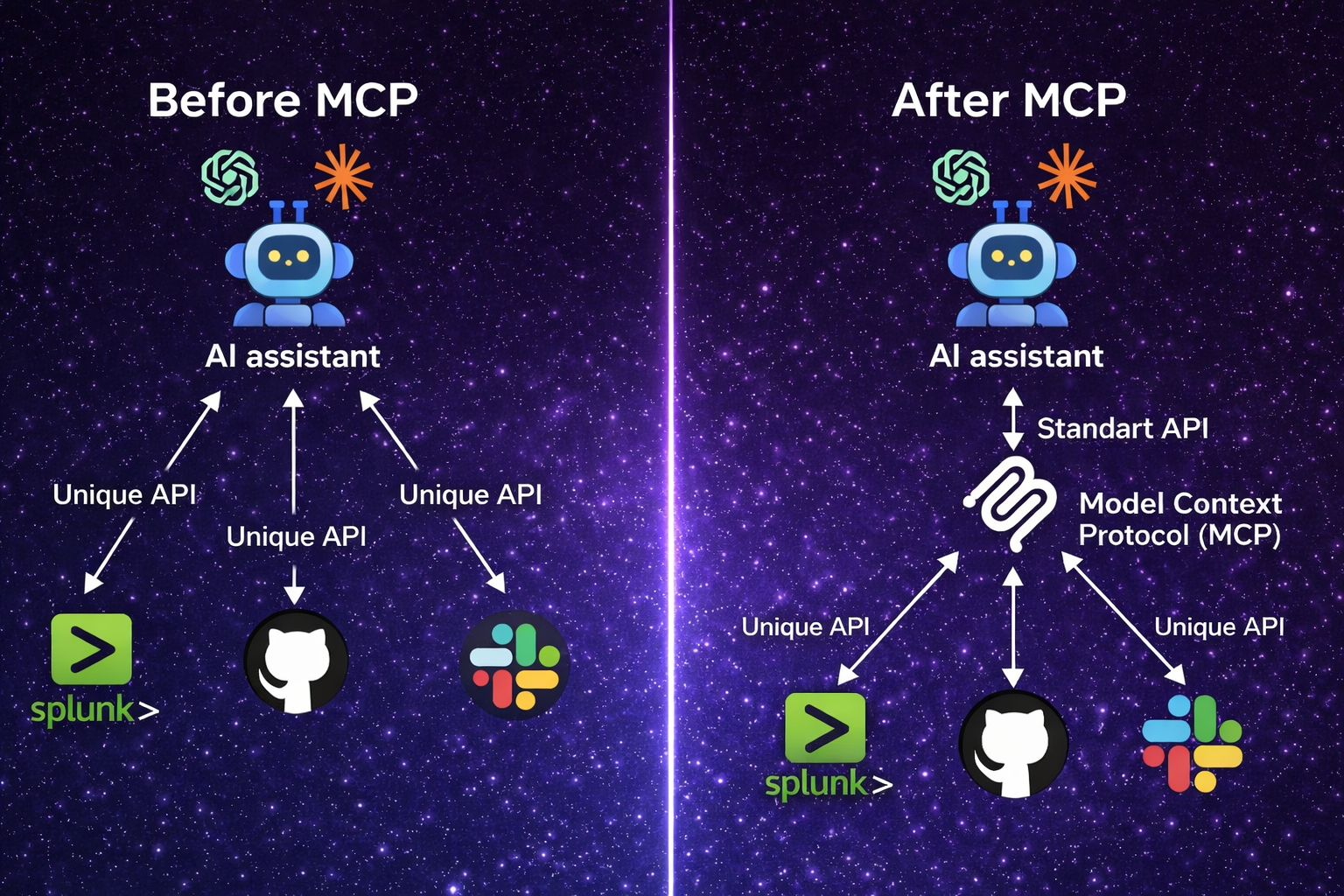
LLM Integration: Before vs. After MCP Adoption
Before MCP, API calls could achieve similar results, but MCP brings context-awareness and structure, enabling LLMs to autonomously discover and use tools based on context and intent, making their interactions more practical, secure, and dynamic.
How an MCP Server Works?
In a typical configuration, the AI model runs inside a host application, such as a UI or agent, where the model is executed. An MCP client within this host enables the model to communicate with external systems using the MCP protocol.
The MCP client connects to the MCP Server, which exposes available tools and resources. The server informs the model about what actions it can perform. The model then requests the needed data or action through the client. The server executes the request and returns the results in a format the model can easily use.
The following image and steps illustrate this flow.
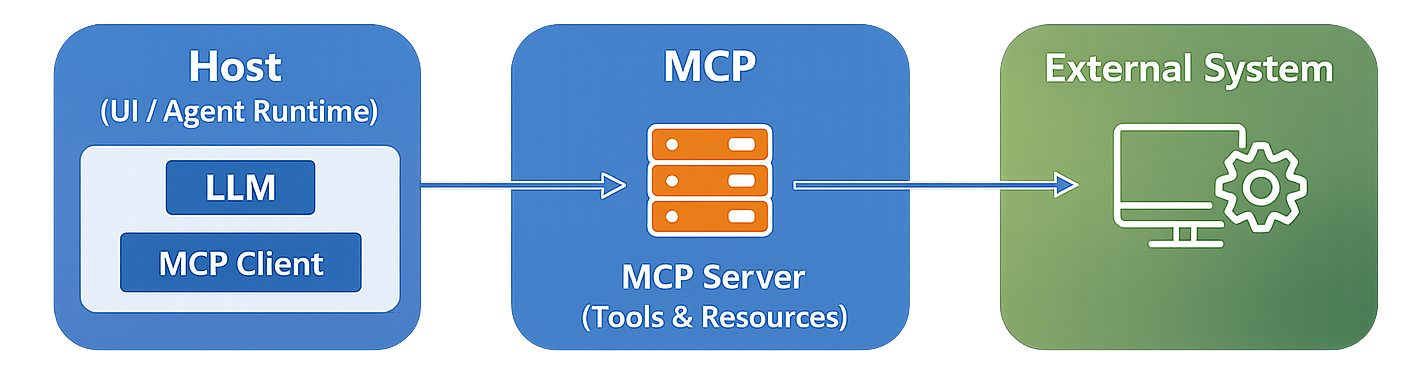
MCP Architecture Flow
1️⃣ The Host is the main application where the LLM runs (such as ChatGPT Desktop or Claude Desktop).
2️⃣ The MCP Client, embedded in the host (provided by the LLM), enables the model to communicate using the MCP protocol (which uses JSON-RPC).
3️⃣ The MCP Server advertises available tools and resources, such as Splunk search or log retrieval.
4️⃣ The LLM selects and invokes the appropriate tool via the MCP client.
5️⃣ The MCP Server executes the request on the corresponding external system, such as Splunk.
6️⃣ Results are returned in a structured format that the LLM can understand and reason over.
Why Use an MCP Server?
- Eliminates the need for custom, model-specific integrations by providing a standardized interface to external systems.
- Centralizes access to tools and data, improving consistency and securityby avoiding integration logic embedded within individual AI applications.
- Simplifies scaling and maintenance as new capabilities are added to AI systems.
- Remains agnostic to both models and platforms, enabling the same integration layer to be reused across different AI systems without modification.
- Transforms an LLM from a simple API-calling interpreter into an autonomous agent capable of dynamically discovering and using tools based on context and intent.
MCP-Based Integration Between Claude and Splunk
This section demonstrates an MCP-based integration between Claude and Splunk at a conceptual level. The focus is on the integration pattern, providing a clear conceptual understanding rather than a real-world production scenario.
The steps below describe how this integration can be implemented:
⚠️ This setup is designed for testing purposes only. Implementing it in a production environment without proper planning and safeguards may lead to security vulnerabilities.
🧩 Step 1: Download the Required Tools
- Download Claude Desktop
- Download Splunk Enterprise
- Download Splunk MCP Server
- Download Splunk AI Assistant for SPL (Optional)
🧩 Step 2: Prepare Splunk for Configuration
- Navigate to the
/opt/splunk/etc/appsdirectory and place the Splunk application files (Splunk MCP Server & Splunk AI Assistant for SPL). - Restart the Splunk service to apply the changes.
- Create an authentication token for secure access between Claude MCP Client and Splunk MCP Server. (Use Splunk Web to create authentication tokens)
The Splunk MCP Server is deployed as a centrally hosted service that accepts connections from multiple MCP clients across different environments.
This centralized deployment allows tools exposed by the Splunk MCP Server to be reused across different clients without requiring local installations or duplicated configurations. Clients connect to the MCP Server using the MCP protocol to interact with Splunk operational data in a controlled and standardized way.
The available tools (as shown in the image below) define the specific Splunk capabilities that can be accessed by LLMs, including search execution, metadata retrieval, and other operational interactions, while keeping data access centralized and governed.
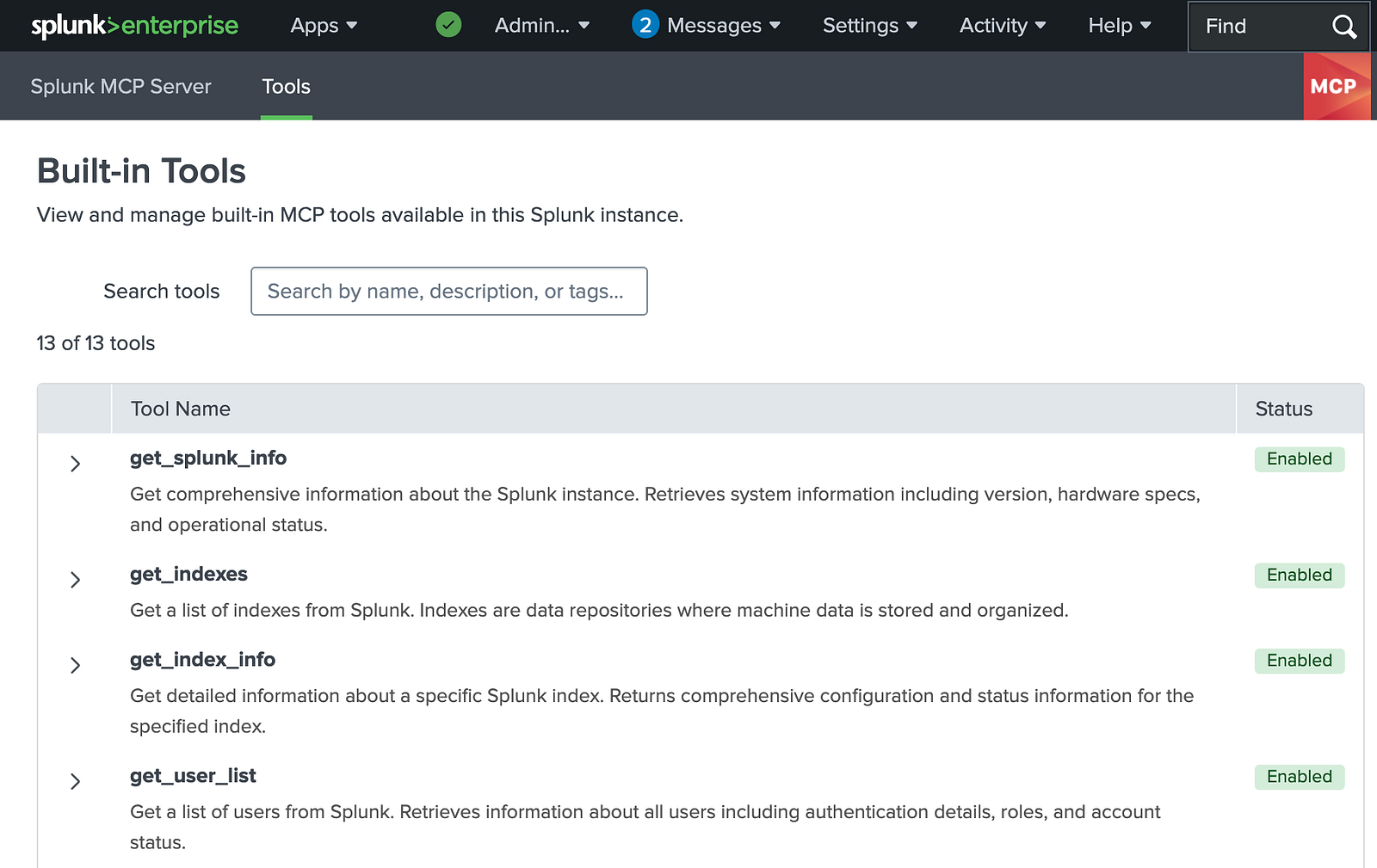
Tools Provided by the Splunk MCP Server
🫧 Splunk AI Assistant for SPL:
The Splunk AI Assistant for SPL is the recommended interface, according to the official Splunk documentation, for interacting with SPL in MCP-enabled workflows.
To expose AI tools such as generate_spl, explain_spl, optimize_spl, and ask_splunk_question through the MCP Server, the Splunk AI Assistant for SPL must be installed.
🧩 Step 3: Configure the Splunk MCP Server and Claude MCP Client
In this step, configure the Claude MCP Client to connect to the Splunk MCP Server by updating the claude_desktop_config.json file with the server endpoint shown in the Splunk MCP Server interface and the authentication token created in the previous step.
{
  "mcpServers": {
    "splunk-mcp-server": {
      "command": "npx",
      "args": [
        "-y",
        "mcp-remote",
        "https://<MCP_SERVER_ENDPOINT>",
        "--header",
        "Authorization: Bearer <YOUR_TOKEN>"
  ],
      "env": {
        "NODE_TLS_REJECT_UNAUTHORIZED": "0"
      }
    }
  }
}
- Replace
<MCP_SERVER_ENDPOINT>with the actual URL of your Splunk MCP Server. - Replace
<YOUR_TOKEN>with the authentication token generated during the Splunk preparation step. - The environment variable
"NODE_TLS_REJECT_UNAUTHORIZED": "0"** disables TLS certificate validation in Node.js. This setting can be useful in development or testing environments when working with self-signed certificates, but it must not be used in production**, as it makes the connection vulnerable to man-in-the-middle attacks. - Save the configuration file as
claude_desktop_config.jsonin the Claude Desktop installation directory.
This configuration enables Claude to communicate with the Splunk MCP Server via the MCP protocol.
You can verify this setup in Claude under Settings → Developer or Settings → Connectors, as shown below.
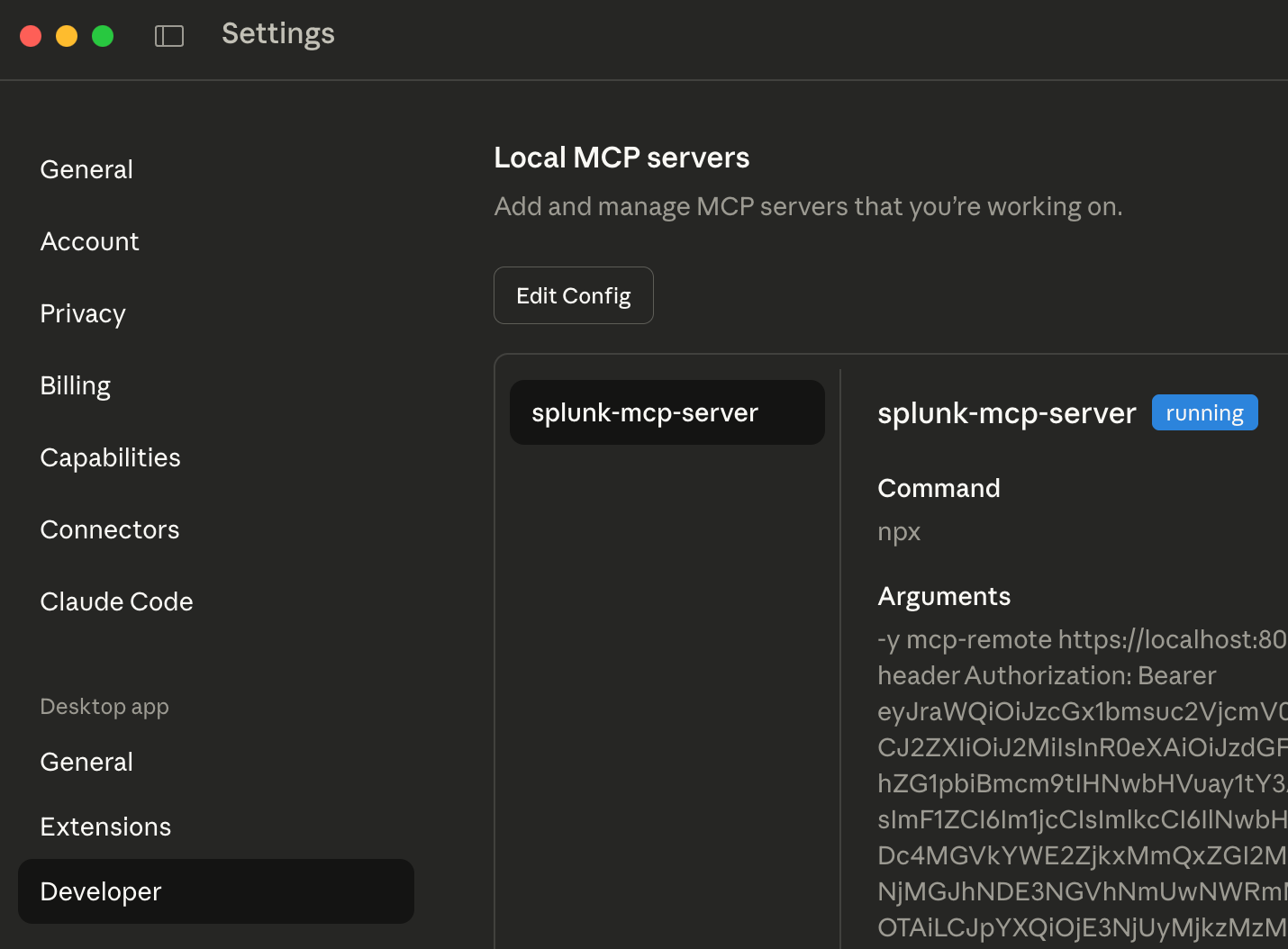
Claude MCP Client Configuration View
🧩 Step 4: Define Prompts
Define initial prompts to validate the MCP integration and provide contextual awareness of the Splunk environment.
For example, start with a discovery prompt to list all available indexes: “List all available Splunk indexes.”
You should see all available indexes in your Splunk environment, as shown below.
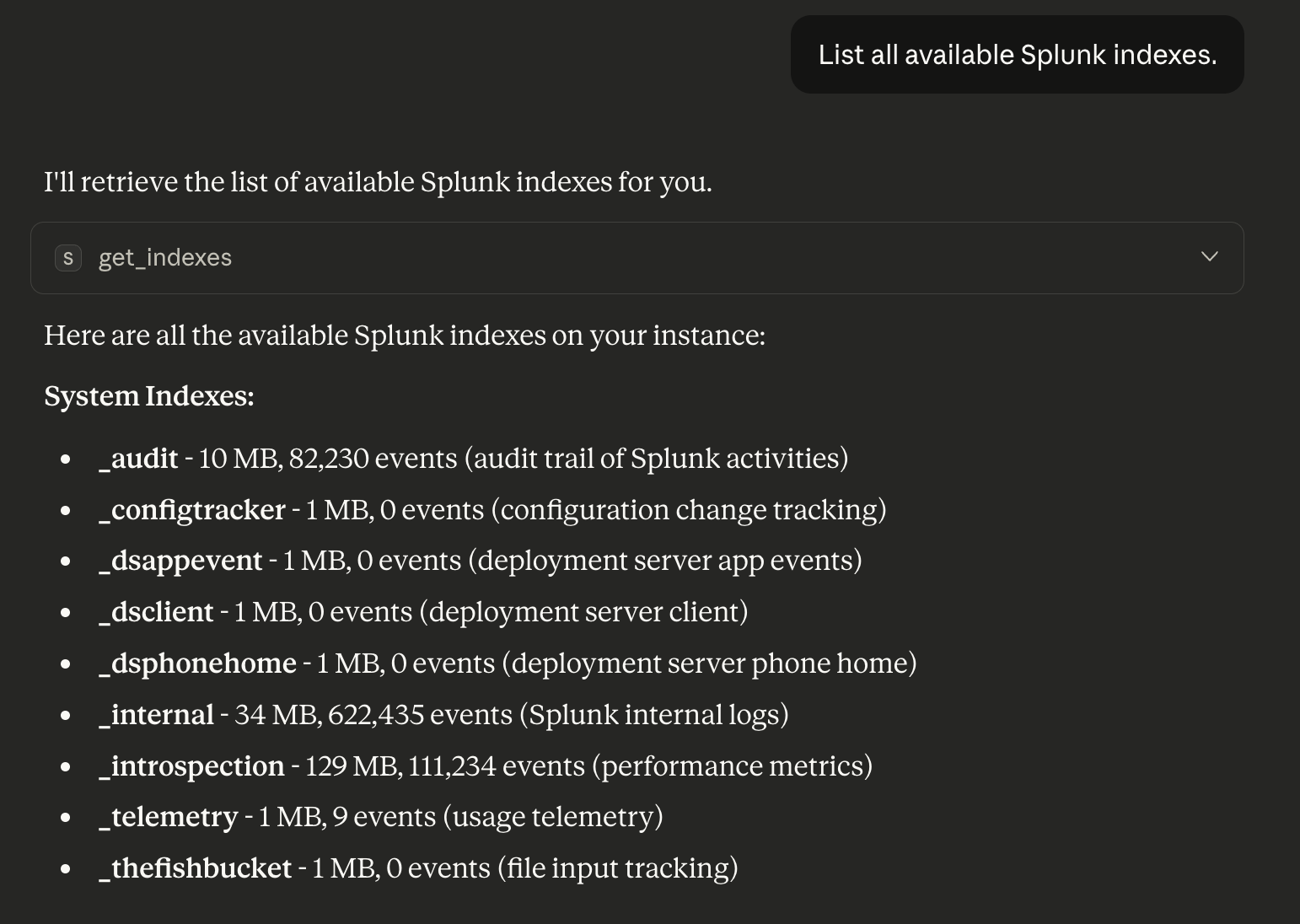
Executing a Sample Prompt in Claude
What Happens During a Query?
At a high level, a query follows this path:
User → Claude (Host) → MCP Client → Splunk MCP Server → Splunk REST API → Result
1️⃣ Host: Claude (Web, Desktop, or Agent Runtime)
The Host is the environment where Claude runs and where user interaction takes place.
The user expresses intent using natural language, for example:
“Analyze failed login attempts in Splunk over the last hour.”
Claude does not immediately call a backend API. Instead, it first interprets the intent and determines how to fulfill the request using the tools exposed by the MCP Server.
At this stage, Claude:
- Accepts the user prompt
- Determines that Splunk data is required
- Plans a multi-step tool-based workflow
- Delegates execution to the MCP Client
2️⃣ MCP Client: The Protocol Layer Inside Claude
The MCP Client works only in the background as part of Claude.
Its core responsibilities include:
- Discovering available MCP tools
- Generating JSON-RPC requests
- Invoking tools such as tools/list and tools/call
In short, the MCP Client acts as a protocol translator, converting Claude’s reasoning into structured machine-to-machine requests.
3️⃣ Splunk MCP Server: The Integration Layer
The Splunk MCP Server is the component deployed to integrate Claude with Splunk. It:
- Receives JSON-RPC requests from the MCP Client
- Maps each request to a specific Splunk capability
- Communicates with Splunk via REST APIs
- Returns structured results back to Claude
Commonly exposed tools include: get_indexes, get_index_info, run_splunk_query, etc.
For example, when Claude needs to analyze failed login attempts, it selects the run_splunk_query tool. The MCP Client generates a JSON-RPC request, the MCP Server executes the corresponding Splunk REST API call, and the response is returned to Claude.
🫧 JSON-RPC and Execution Flow
JSON-RPC provides a clean and standardized way to execute tools:
- Claude decides which tool to invoke
- The MCP Client serializes the request using JSON-RPC
- The MCP Server executes the backend logic in Splunk
- A correlated JSON-RPC response is returned
This approach cleanly separates reasoning, execution, and data access.
4️⃣ From Raw Results to Human Insight
Once the response is received, Claude takes over again.
Rather than returning raw JSON or SPL output, Claude:
- Interprets the data
- Identifies patterns and anomalies
- Summarizes findings
- Presents insights in natural language
For example:
“In the last hour, 342 failed login attempts were detected. Most attempts targeted the admin account, with 70% originating from external IP addresses.”
🫧 Bonus: Using Continue as an MCP Client for LLMs
Continue offers a VS Code extension that acts as an MCP client, allowing easy connection of an LLM to MCP servers via a simple config file. It’s a convenient tool for experimenting with MCP-based integrations during development.
By adding your MCP server configuration to the .continue/config.yaml file, you can connect Continue to your MCP server and expose its tools to the selected LLM.