Splunk Talking to Splunk: Federated Search in 5 Minutes
Picture two separate instances of Splunk—one for production use, and another one for testing purposes. If we were to retrieve data from the two instances, it would require pipelines, forwarders, or something of that sort. But imagine having the ability to just simply…search across both through a third instance of Splunk.
Here’s where federated search comes into play, first introduced in Splunk Enterprise 8.2 and Splunk Cloud Platform 8.1.2103 [1] [2]. Splunk will reach out to the other Splunk indexes during query time and fetch the results like there was no need for data movement. Easy peasy! ✨
Getting Started
This scenario comprises three independent Splunk environments:
- splunk_s1 and splunk_s2 are two distinct Splunks. Think of them as independent clusters, containing data, configuration settings, props/transforms/event types, and all kinds of stuff.
- splunk_s3 is our search head that contains no data, only reaches into s1 and s2 on query time.
[ splunk_s1 ]  <── federated search (mgmt port) ──┐
                                                   [ splunk_s3 ]
[ splunk_s2 ]  <── federated search (mgmt port) ──┘
All configurations are done in splunk_s3 only. splunk_s1 and splunk_s2 require no modification, just that they are up and accessible on their respective management port interfaces.
Note: This process has been tested on Splunk Enterprise version
9.4.11, having three separate instances.
Configuration
Option A - Config Files (Preferred)
Config files are replicable, version-controllable, and function the same in all Splunk versions.
Step 1a — Define the Federated Providers
Create $SPLUNK_HOME/etc/system/local/federated.conf on splunk_s3 [3]:
[provider://splunk_s1]
hostPort               = x.x.x.x:8089
mode                   = standard
type                   = splunk
serviceAccount         = admin
password               = topSecretAdminPassword
useFSHKnowledgeObjects = 0

[provider://splunk_s2]
hostPort               = x.x.x.x:8090
mode                   = standard
type                   = splunk
serviceAccount         = admin
password               = topSecretAdminPassword
useFSHKnowledgeObjects = 0
Password: Plain text here, Splunk will convert it into a
$7$...encrypted password after restarting the server for the first time.
useFSHKnowledgeObjects = 0: This stops the synchronization of knowledge objects from the remote server. It can only be changed to 1 when there is any specific requirement to do so.
Step 2a - Map the Federated Indexes
Append the following configuration settings to $SPLUNK_HOME/etc/apps/search/local/indexes.conf file located on splunk_s3 host:
[federated:s1_internal]
federated.dataset  = index:_internal
federated.provider = splunk_s1

[federated:s2_internal]
federated.dataset  = index:_internal
federated.provider = splunk_s2

[federated:s1_dm_network_traffic]
federated.dataset  = datamodel:Network_Traffic
federated.provider = splunk_s1

[federated:s2_dm_network_traffic]
federated.dataset  = datamodel:Network_Traffic
federated.provider = splunk_s2
It should be noted that federated.dataset accepts different remote dataset types:
index:_internal- is mapped to a raw indexdatamodel:Network_Traffic- is mapped to a data model accelerated on the remote side
For other dataset types (saved search, last job, metric index), see the Splunk docs.
Then restart splunk_s3 and jump to Run & Verify.
Option B - Using the UI
Not keen on typing? Here’s how you can set everything up through the UI on splunk_s3.
Step 1b — Adding Federated Providers
Click on Settings → Federated Search → Federated Providers → Add federated provider [4].
Repeat for both splunk_s1 and splunk_s2:
| Field | splunk_s1 | splunk_s2 |
|---|---|---|
| Provider mode | Standard | Standard |
| Provider name | splunk_s1 |
splunk_s2 |
| Remote host | x.x.x.x:8089 |
x.x.x.x:8090 |
| Service account username | admin | admin |
| Service account password | your password | your password |
Click the Test connection button prior to saving; ensure you see a green box saying “Connection successful.”
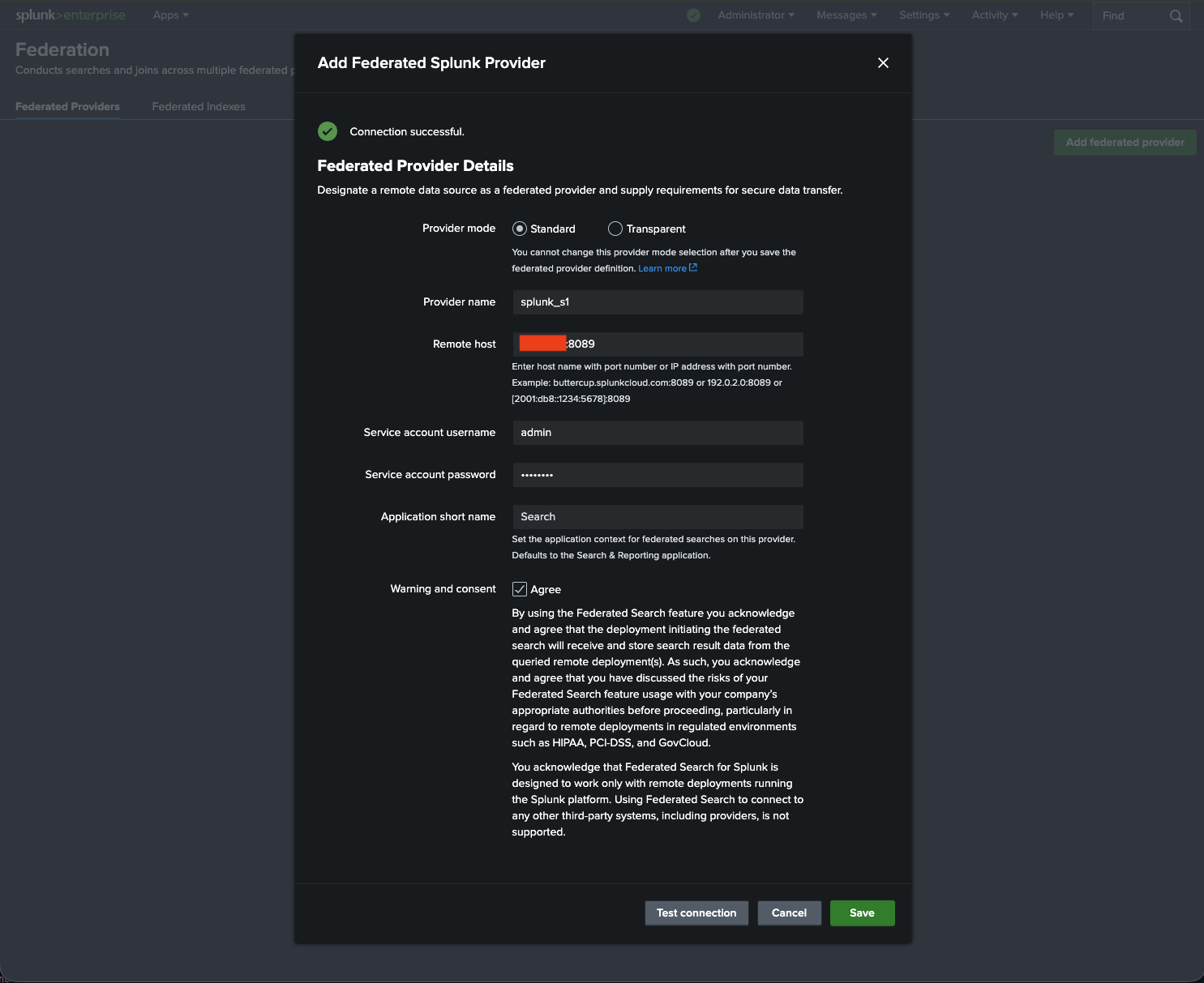 |
|---|
| Figure 1: Adding splunk_s1 to be a federated provider on splunk_s3. |
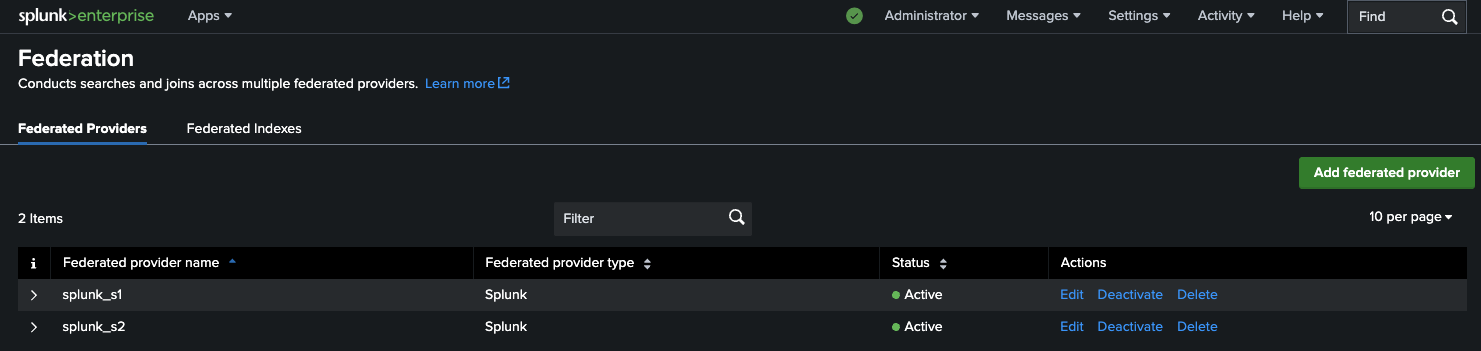
Now that you have both providers added, your Federated Providers window will look like this:
 |
|---|
| Figure 2: List of federated providers for splunk_s3 — both instances enabled. |
Step 2b — Add Federated Indexes
Navigate to Federated Indexes → Add federated index and create all four mappings:
| Federated index name | Federated provider | Dataset type | Dataset name |
|---|---|---|---|
s1_internal |
splunk_s1 | Index | _internal |
s2_internal |
splunk_s2 | Index | _internal |
s1_dm_network_traffic |
splunk_s1 | Data model | Network_Traffic |
s2_dm_network_traffic |
splunk_s2 | Data model | Network_Traffic |
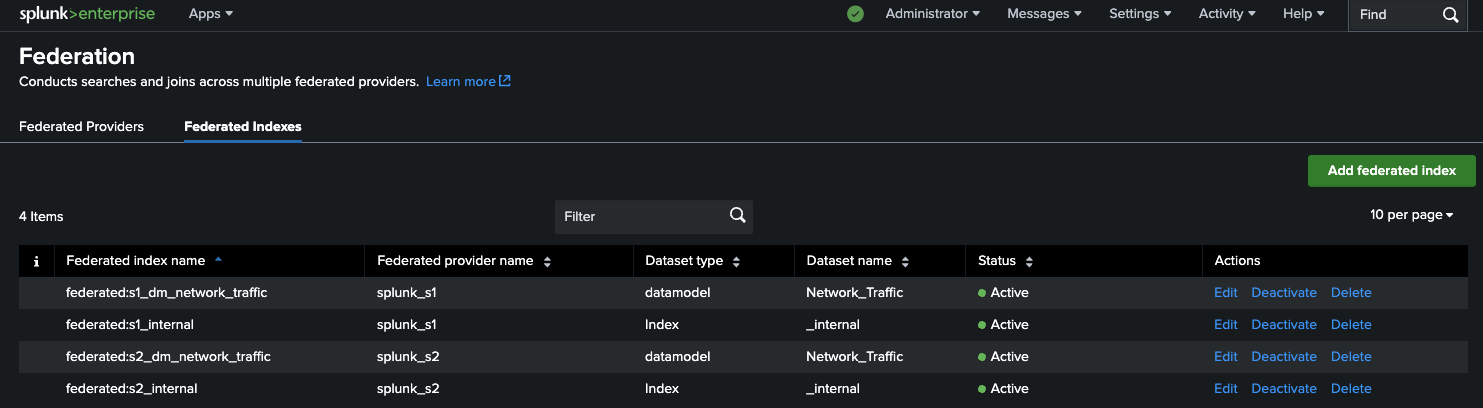 |
|---|
Figure 3: List of Federated Indexes within splunk_s3, with all four mappings active. |
Run & Verify
No matter which road you have followed, proceed to Search & Reporting on splunk_s3.
Query the _internal indexes
index=federated:s1_internal OR index=federated:s2_internal
| stats count by splunk_federated_provider
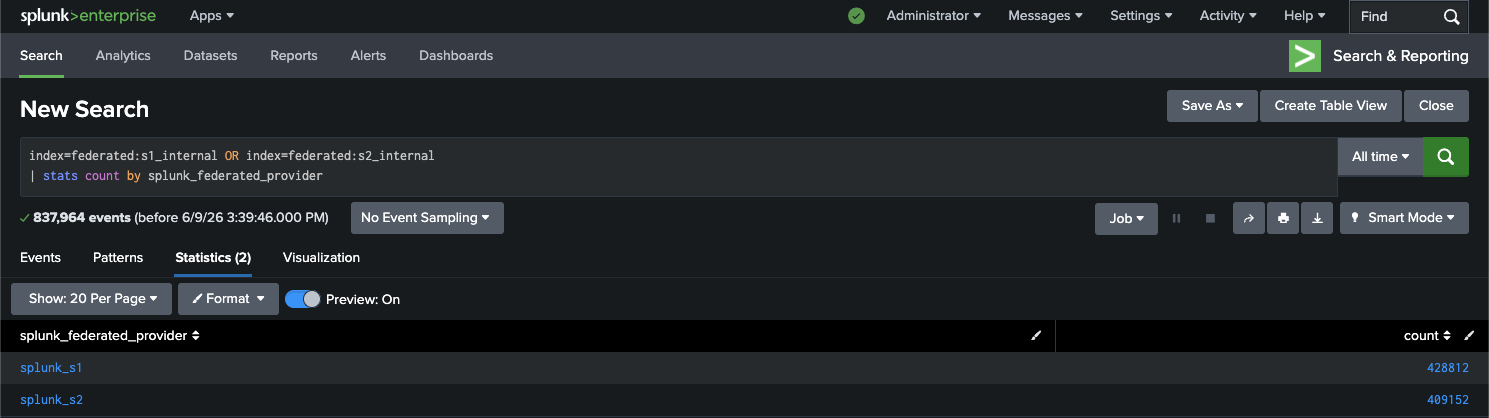 |
|---|
Figure 4: _internal index search results from both instances, consolidated on splunk_s3. |
Query the Network_Traffic data model
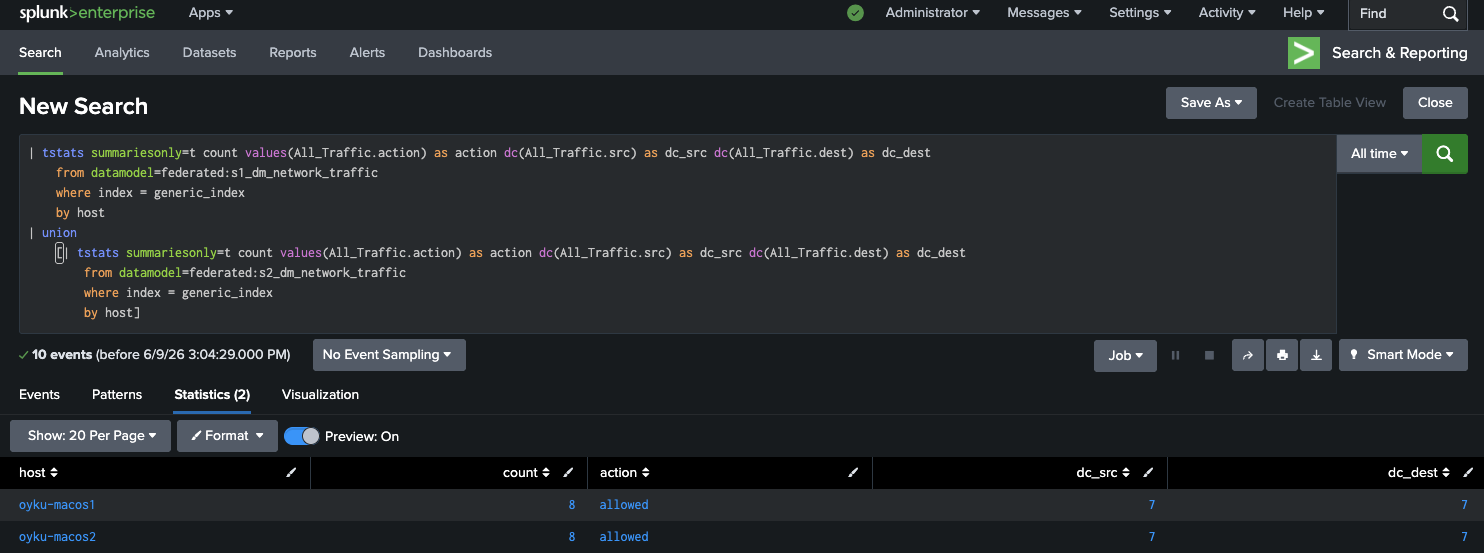
Using tstats for accelerated data model search:
| tstats summariesonly=t count values(All_Traffic.action) as action
    dc(All_Traffic.src) as dc_src dc(All_Traffic.dest) as dc_dest
    from datamodel=federated:s1_dm_network_traffic
    where index = generic_index
    by host
| union
    [| tstats summariesonly=t count values(All_Traffic.action) as action
        dc(All_Traffic.src) as dc_src dc(All_Traffic.dest) as dc_dest
        from datamodel=federated:s2_dm_network_traffic
        where index = generic_index
        by host]
 |
|---|
Figure 5: tstats results from both instances, unified on splunk_s3. |
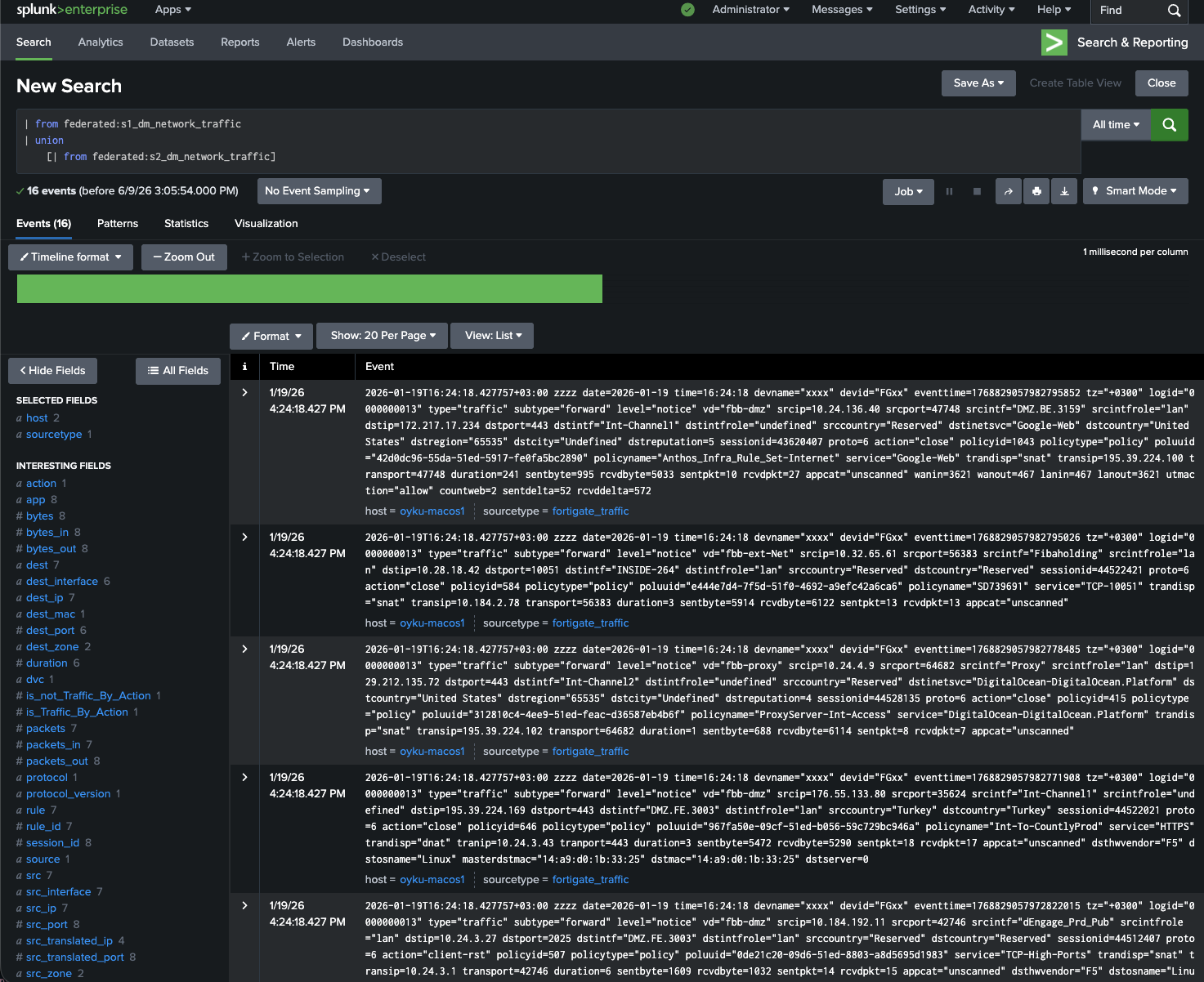
Or using from for a simpler event-level query:
| from federated:s1_dm_network_traffic
| union
    [| from federated:s2_dm_network_traffic]
 |
|---|
Figure 6: from query pulling raw events from both federated data models. |
Note: Whether you used the UI or conf files, the result is identical. The UI simply writes to the same conf files under the hood.
Things To Remember
-
Port availability: Federated search makes use of the management port and not the data input port. In case you have any connectivity problem, first check your firewall rules. Use
curl https://x.x.x.x:<mgmtport>/servicesfrom splunk_s3 to test reachability. -
Configs stay on the remote side: Configurations for any kind of knowledge object (props, transforms, eventtypes, tags) should be performed on splunk_s1 and splunk_s2. splunk_s3 is only a federated configuration file; no inheriting of remote configurations on this machine is done unless
useFSHKnowledgeObjects = 1. -
Permissions: When using an unprivileged service account, ensure that the service account can read from target indexes and data models from the remote machine, including the internal indexes which are by default inaccessible [1].
-
No existing conf files:
federated.confandfederated:stanzas insideindexes.confare not included by default in Splunk. Make them from scratch as Splunk will pick them up automatically after a restart.
Conclusion
Federated Search seems like a intimidating task when written down, but it’s fairly simple to accomplish – a couple of configuration files and a restart from the search head, and now you can search across several Splunk installations as if it was a single one. No need for forwarders or any additional pipelines!
💬 I would appreciate your thoughts, ideas, and suggestions, feel free to comment below! Also, you can connect with me on LinkedIn! 🧚🏽♀️
Till next time! 👋
References
[1] Splunk. (n.d.-a). About Federated Search for Splunk. Splunk Documentation. Retrieved from https://help.splunk.com/en/splunk-enterprise/search/federated-search/9.4/run-federated-searches-across-other-splunk-deployments/about-federated-search-for-splunk
[2] Splunk. (2021). Introducing Splunk Federated Search. Splunk Blog. Retrieved from https://www.splunk.com/en_us/blog/platform/introducing-splunk-federated-search.html
[3] Splunk. (n.d.-b). federated.conf. Splunk Documentation. Retrieved from https://help.splunk.com/en/splunk-enterprise/administer/admin-manual/10.4/configuration-file-reference/10.4.0-configuration-file-reference/federated.conf
[4] Splunk. (n.d.-c). Define a Splunk platform federated provider. Splunk Documentation. Retrieved from https://help.splunk.com/en/splunk-enterprise/search/federated-search/9.4/run-federated-searches-across-other-splunk-deployments/define-a-splunk-platform-federated-provider
[5] Splunk. (n.d.-d). Service accounts and security for Federated Search for Splunk. Splunk Documentation. Retrieved from https://help.splunk.com/en/splunk-enterprise/search/federated-search/9.4/run-federated-searches-across-other-splunk-deployments/service-accounts-and-security-for-federated-search-for-splunk